


Acuity Trading: Reading Asset Scores, Trade Ideas and Signal Results
Acuity Trading supplies research, news and sentiment tools that brokers can incorporate into their trading platforms and client communications. Its products address different stages of a trader's research: finding an asset worth investigating, examining a specific trade idea and following what happened after publication. Those stages also produce different numbers. An AssetIQ opportunity score, an analyst's confidence level and a signal's reported return in risk units describe different things.
For a broker building a research service, the useful distinction is between market context, a proposed trade and an executed customer order. Acuity's documentation shows how these layers connect, while also identifying where the data feed, signal type and reporting convention change the interpretation.
AssetIQ: a score that brings several market inputs together
AssetIQ combines technical and alternative data in an opportunity score. Acuity lists moving-average crossings and comparisons, price trend and momentum, news sentiment, volatility and volume among the inputs. Users can compare an asset with others in its sector or market and place corporate events, economic releases and news alongside price movements.
This gives a broker a way to connect a watchlist with research context. A price move can be examined together with changing sentiment or an approaching event, rather than being presented as an isolated number. NewsIQ adds news selection and sentiment context within the wider Market Intelligence offering.
The score should be read as a composite research indicator. It does not, by itself, establish the probability that a customer will make money. There is also a practical data dependency: Acuity says the MetaTrader version uses the broker's market data by default, while external market data for a web deployment requires prior configuration. A broker comparing two screens therefore needs to know which price series each screen uses before treating a difference as a scoring problem.
AnalysisIQ: identify who or what generated the idea
AnalysisIQ moves from asset-level context to individual trading ideas. The analyst series includes an entry level, two targets, a stop-loss level and an analyst confidence indicator. Acuity describes the research as combining technical analysis with sentiment and calendar information. Confidence belongs to that research assessment; it is separate from the distance between entry, stop and target.
The knowledge base distinguishes three types in the interface: analyst ideas in blue, AI-driven ideas in orange and pattern ideas in purple. Type filters and labels matter because sharing a dashboard does not make their generation methods or lifecycles identical.
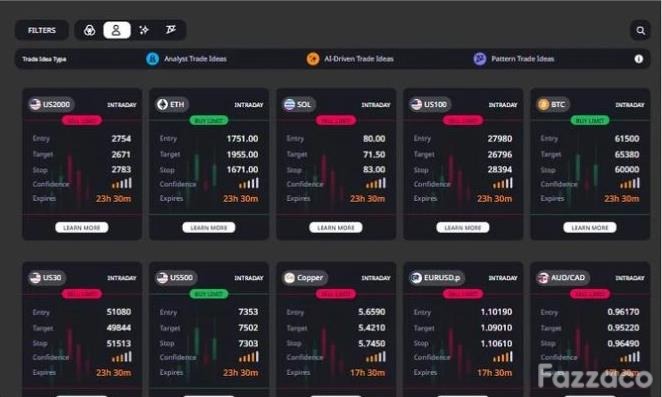
AnalysisIQ interface illustration from Acuity Trading’s knowledge base; the displayed prices are part of the illustration.
For the AI series, Acuity describes a pipeline combining technical analysis, news-language processing, sentiment and volatility inputs. Its documented entry zone extends 1% either side of an indicated level. That differs from interpreting an analyst's specified entry as a single trigger. A broker distributing cards by email or through a client portal should preserve the idea type and its entry convention, so that a compact notification does not strip away the information needed to understand it.
A live signal is not an executed customer order
In the analyst workflow, a newly published idea can remain untriggered until its entry level is reached. It then becomes live; the documentation describes profit and loss closures by reference to the first target and stop. The AI guide instead starts its live lifecycle when the entry range is reached and allows more than one idea on the same asset to be open at once.
These are research-system states. They do not confirm that a particular customer placed an order, received that price or used the same position size. In supported MetaTrader and cTrader integrations, the trade control can open a ticket with parameters already filled in. Acuity's AnalysisIQ FAQ says automatic order execution cannot currently be enabled. Opening an order ticket and executing an order are separate steps.
Reading performance in R requires the closing rules
Acuity's analyst-performance documentation expresses outcomes in R, a multiple of the risk defined by the idea. Consider a hypothetical long idea with entry at 100, stop at 98 and first target at 104. The initial price risk is two units; reaching the target represents a two-R price move. That describes the relationship between levels, not the chance of reaching the target or a 2% return on a customer's account.
The documented intraday analyst convention also assigns a closing price when neither target nor stop has been reached: 21:00 UK time, or 16:00 UK time on the following day for Asia-Pacific ideas. Acuity warns that its prices may differ from those in a broker account. These cut-offs help explain why a research result and a customer's trade history need not match, even when both refer to the same instrument.
Those conventions should not be silently applied to every idea in the dashboard. The AI guide describes its own entry-range and performance rules. Combining analyst and AI results without identifying the relevant rules would obscure what is being measured. Comparing account outcomes additionally requires actual fills, transaction costs and position sizing.
Presentation settings change the research experience
Acuity also provides a presentation choice for AnalysisIQ and relevant Research Terminal components. Its Compliance-Friendly Mode replaces action-oriented wording with analytical terms such as bullish or bearish, uses support and resistance terminology, and hides elements including specific entry prices and performance information. The option is managed through product customisation settings.
For a broker, this is a concrete difference in the information shown to the reader; the mode's name alone does not establish that a particular deployment meets every applicable requirement. It also means two installations can legitimately show different fields. A clear Acuity integration keeps the meaning of each number intact: AssetIQ supplies asset context, the idea type explains the research method, and performance reporting needs its own price and time conventions. The customer's execution record remains a separate source of evidence.
 Subscribe Now