


AdenaSoft: Forex CRM, Back Office and Broker Technology
AdenaSoft provides software for financial-services businesses, with a forex technology offering that connects CRM, customer-service administration, introducing-broker management, risk monitoring and financial bridging. Its white-label approach centres on how those systems work together: customer information entered on a website or partner portal can feed the back office, while trading and account data support sales analysis and operational oversight.
For a brokerage, this is an operating-system question as much as a trading-interface question. Opening an account, processing a withdrawal, calculating partner activity and investigating an exposure alert involve different teams, but they depend on related records. AdenaSoft’s product range addresses those handoffs through interconnected applications, alongside PAMM/MAM and copy-trading technology for businesses offering managed or social-trading services.
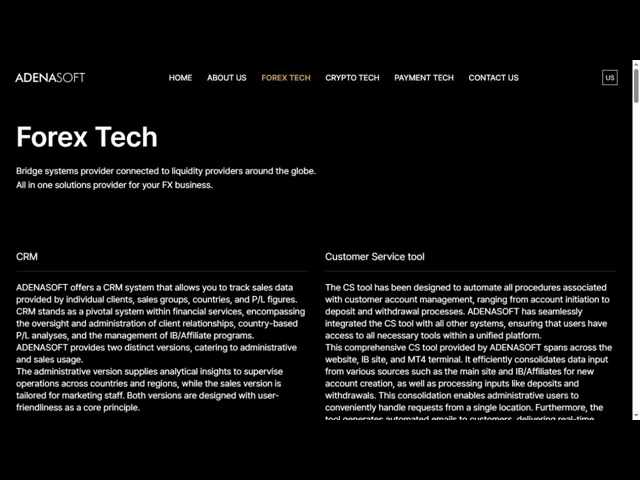
AdenaSoft Forex Tech: CRM and customer-service tools. Source: AdenaSoft.
A connected software stack for brokerage operations
AdenaSoft positions its Forex Tech offering as an all-in-one solution for FX businesses. The published modules cover CRM, customer-service tools, IB/affiliate websites, risk management, financial bridges and money-management systems. MetaTrader 4 and MetaTrader 5 appear in its bridge and PAMM/MAM descriptions, while its customer-service description specifically references the website, IB site and MT4 terminal.
The distinction between these components helps a broker define a deployment. CRM provides a view of customer relationships and commercial activity. Customer-service tools coordinate account requests. The bridge connects to liquidity infrastructure. Monitoring tools highlight events requiring attention. Managed-account and copy-trading functions introduce additional allocation workflows. A useful implementation connects these responsibilities without assuming every employee needs the same interface or permissions.
A shared customer record is a practical starting point. The brokerage needs to associate a client’s website registration, trading account, partner relationship and service requests consistently. That relationship becomes especially important when a customer has several accounts, an IB introduces multiple clients or an operations team needs to reconcile a request with an account movement.
CRM views for administrators and sales teams
AdenaSoft describes two CRM versions: one for administrative users and another for sales use. The administrative version provides analytical information across countries and regions; the sales version is intended for marketing staff. Published reporting dimensions include individual clients, sales groups, countries and profit-and-loss figures, together with IB and affiliate programme management.
These different views correspond to different questions. A sales team may need to understand the activity of its assigned customers or the development of a regional pipeline. An administrator may need a broader comparison of operations across countries and groups. Separating those views can make the same underlying records more useful to each role, provided access and reporting definitions match the brokerage’s structure.
The treatment of P/L deserves explicit definition during setup. A trading-account result, a sales performance measure and a brokerage revenue measure are not interchangeable. Before a report becomes part of management decision-making, the team should know which source records it includes, which period it covers and how transfers, commissions or other adjustments are treated. This makes cross-country and cross-team comparisons interpretable.
Customer-service workflows from registration to withdrawals
The customer-service tool is designed to automate account-management procedures from account creation to deposits and withdrawals. AdenaSoft says it consolidates inputs from the main website and IB/affiliate sites, allowing administrative users to handle requests in one location. Automated customer emails provide updates as those requests move through the process.
The published operational functions include live and demo account management, profile updates, KYC checks, internal transfers, leverage changes and deposit/withdrawal management. Leads management and A-book/B-book management also appear in the platform feature lists. Together, these functions place account servicing close to the records used by the brokerage’s other teams.
A withdrawal illustrates the value of coordinated records. Customer support needs to identify the request and communicate its status; operations needs the relevant account and transaction details; finance needs to reconcile the resulting movement. A configured workflow should give those teams a common reference without allowing a customer notification to be mistaken for confirmation that settlement has completed.
Automation works best when exception handling is equally clear. A profile change, an incomplete KYC review or a request involving more than one account may need additional attention. Defining the responsible role, the next action and the information visible to the customer helps the brokerage use automation for routine work while keeping individual cases manageable.
IB and affiliate tools beyond a referral link
AdenaSoft’s IB/affiliate website is a management environment for partner-introduced clients. Published capabilities include client searches, trading history, deposits and withdrawals, market watch, real-time trading and orders, internal transfers and downloadable Excel data. Sorting dimensions include positions, lots, opening and closing times, P/L and commission statistics.
This gives the partner channel a data workflow as well as an acquisition workflow. A brokerage can connect a partner relationship with the activity generated by that relationship, then use reports to support servicing and commercial discussions. The vendor also describes language support, settlement programmes and analysis of customer trading patterns within the IB offering.
Commission reporting is most useful when it can be reconciled to the agreed commercial rules. The broker should establish the calculation period, eligible activity, account attribution and treatment of adjustments before using a report for settlement. A clear relationship between the partner record and the underlying transactions reduces manual investigation when a commission query arrives.
Risk monitoring across accounts, trading and liquidity
AdenaSoft’s risk-management description focuses on alerts for events requiring a risk manager’s attention, including trading behaviour and system errors. Its published monitoring items cover exposure, floating P/L, negative balances, trading size, leverage changes, liquidity-provider balances and MT4/MT5 symbol monitoring. The list also includes deposit/withdrawal activity and the interval between trading and withdrawals.
These are different categories of operational signals. Exposure and floating P/L help the dealing team understand its current position. A liquidity-provider balance is relevant to the resources available at an execution counterparty. Symbol monitoring concerns the trading environment, while changes in account or withdrawal activity can require investigation by operations. Assigning ownership to each signal makes an alert more actionable.
Alert configuration should connect the observed event with a response. For example, a balance threshold can have a responsible team and an escalation path; an unusual trading-size event can be reviewed alongside the affected account and instrument. Monitoring describes what is happening. The broker’s response procedure determines what happens next, including whether additional review or an execution-policy change is appropriate.
Financial bridging and trading-platform connections
The Finance Bridge Tech offering is described as connecting to liquidity providers across forex, CFD, commodities and cryptocurrency markets. This places bridging within the wider account and operations stack, rather than presenting it as an isolated application. For a brokerage using MetaTrader-based workflows, the connection between trading activity and back-office records is a central deployment consideration.
Technical integration needs a concrete instrument and account map. Symbol names, contract definitions, account groups and transaction references must remain intelligible as data moves between the trading platform, liquidity connection and administrative tools. The most useful acceptance exercise follows representative orders and their resulting account records through the entire workflow.
The public product overview establishes the scope of the bridge offering but does not supply a detailed provider-by-provider connectivity matrix or measured execution benchmark. An implementation discussion can therefore focus on the intended providers, required interfaces and operational behaviour for the broker’s actual instruments. Those details define the project more precisely than a general promise of connectivity.
PAMM/MAM product presentation on the AdenaSoft website. Source: AdenaSoft.
PAMM, MAM and copy trading serve different workflows
AdenaSoft describes PAMM as allowing investors to allocate capital to funds managed by traders, with profits distributed in proportion to the allocation. Its MAM description focuses on copying forex transactions executed by master accounts. The vendor presents both as technology for white-label businesses managing client-asset workflows and for fund managers incorporating social-trading features.
The distinction affects records and servicing. A proportional-allocation model needs clear information about allocations and distributions. A master-account model needs a reliable relationship between the initiating activity and the participating accounts. In either case, operations teams need to explain the account outcome using the records produced by the configured service.
AdenaSoft also offers copy-trading technology as standalone products and white-label services. This creates a separate route for businesses developing a social-trading proposition. The selection between PAMM, MAM and copy trading should follow the intended customer experience and account structure, including participation changes, reporting and the way the service handles individual account constraints.
How the modules fit together
| Module | Published function | Business workflow |
|---|---|---|
| CRM | Administrative and sales views; customer, group and regional analysis | Customer relationships and commercial oversight |
| Customer-service tools | Account requests, KYC functions, transfers and notifications | Registration and ongoing account servicing |
| IB/affiliate website | Client activity, commission statistics and exports | Partner management and settlement preparation |
| Risk monitoring | Account, exposure, trading and provider-balance signals | Dealing and operational investigation |
| Bridge technology | Connections to liquidity providers | Trading-platform and execution integration |
| PAMM/MAM and copy trading | Allocation or master-account trading workflows | Managed-account and social-trading services |
Payment technology and implementation priorities
Beyond forex technology, AdenaSoft markets a payment-services white-label platform with web and mobile interfaces, customer administration, partner APIs and reporting. Its listed functions include individual and merchant registration, KYC checks, deposits, withdrawals, transfers and currency exchange. This is a distinct technology offering for payment-service businesses; the presence of the product does not by itself establish which payment connections a brokerage has contracted.
For a forex implementation, the priority is to define the handoffs between modules. Start with customer and account identifiers, then map registration, funding, trading, partner activity and reporting. Agree which system owns each record and how exceptions reach the responsible team. This gives the project a sequence based on business operations rather than a checklist of screens.
A representative pilot can include an introduced client opening an account, completing the required review, receiving a funding update, trading and appearing in the appropriate partner report. A second scenario can examine an account-service exception or a risk alert. These exercises show whether the connected stack supports the brokerage’s day-to-day work before the deployment is expanded.
 Subscribe Now