


ClickAlgo: cTrader Tools, Xen AI and Trading Software Development
ClickAlgo supplies trading software and an AI-assisted development environment for traders and developers. Its current offering combines downloadable indicators and cBots with Xen, a platform for creating, inspecting and compiling cTrader tools. For brokers, education businesses and software teams, the relevant B2B use case is extending a trading ecosystem with focused applications rather than replacing the broker's trading engine or liquidity infrastructure.
A software layer around an existing trading platform
The ClickAlgo website organizes products into trading automation, indicators, trade management, risk management, utilities and plugins. The navigation also includes NinjaTrader software and links to separate Xen services for cTrader, NinjaTrader, TradingView and MetaTrader. These are platform-specific routes, not a statement that every download works on every platform.
The main site's disclaimer identifies its charting indicators and cBots as designed for cTrader Desktop. Individual product pages may specify additional compatibility details. A buyer should therefore attach platform, operating-system and version requirements to the exact product under consideration, rather than relying on the breadth of the catalog.
This is a different technology layer from a brokerage CRM, execution bridge or complete white label. A dashboard summarizes information; a cBot may execute a defined strategy; a coding assistant generates software. The evaluation should distinguish what a tool displays, what it changes and what remains controlled by the trading platform.
ClickAlgo's product families and business uses
| Product family | Published scope | Evaluation focus |
|---|---|---|
| Indicators | Trend, momentum, volume, volatility, price structure and chart analysis | Calculation method, inputs and interpretation |
| Automation | Algorithmic strategies and starter cBots | Order logic, permissions and restart behavior |
| Trade management | Execution, position management and stop/target tools | Which account actions the application can perform |
| Risk tools | Monitoring dashboards, risk/reward tools and alerts | What is measured, alerted or actively enforced |
| Xen for cTrader | Requirements review, C# generation, compilation and backtest analysis | Specification quality, source inspection and validation |
These categories support different procurement goals. An education team might need a transparent visual explanation; a developer might need an editable starting point; an operations team might need a tested position-management utility. Describing the intended task first makes product demonstrations more useful than comparing catalog size alone.
Xen for cTrader: from requirements to a compiled tool
Xen for cTrader describes a workflow for creating cBots, indicators, dashboards and trading interfaces using natural-language requirements. Its published functions include reviewing a specification for missing logic or contradictions, generating code, compiling a project and using compiler output to repair build errors.
The platform separates Trader View from Coder View. Trader View focuses on guided creation, while Coder View exposes C# source, project versions and build errors. The distinction is useful for a team in which a subject-matter specialist defines behavior and a developer reviews the implementation. Both roles can work around the same project specification.
A requirements document should define the application type, symbols and timeframes, inputs, entry and exit conditions, sizing rules and behavior during interruptions. An indicator that colors a chart needs different acceptance criteria from a cBot that submits orders. Clear requirements reduce ambiguity before code generation starts.
Compilation confirms that a project can be built under the selected environment. It does not by itself establish that the logic implements the requested strategy, that an external connection behaves correctly, or that trading is profitable. Those questions require separate functional checks and platform testing.
Backtest analysis and controlled iteration
Xen's public feature list includes uploading cTrader backtest reports for explanation and using cTrader's optimization engine before asking the assistant to analyze settings and parameter behavior. This keeps the trading platform's test output distinct from the assistant's interpretation of that output.
A development team can preserve the specification, source version, parameter set, dataset and report for each iteration. When a rule changes, the team can compare the relevant behavior rather than only the final profit figure. A change intended to repair an order-management defect should be verified against that defect before broader optimization continues.
For a broker offering educational resources, this creates a potential workflow for teaching reproducibility: explain a rule, build it, inspect trades and discuss sensitivity to assumptions. A historical backtest remains a simulation under defined conditions. Neither AI analysis nor a successful build turns it into a forecast of future returns.
Trend Matrix: a concrete example of transparent product logic
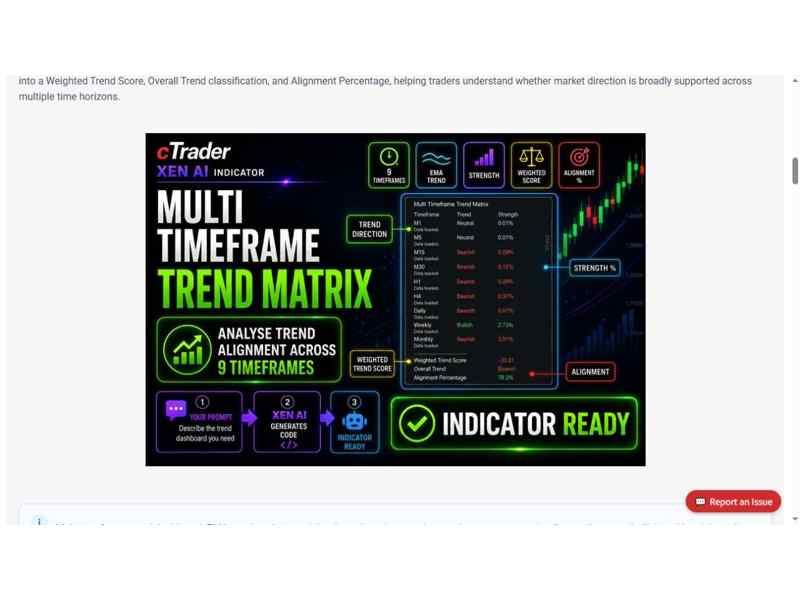
Source: ClickAlgo Trend Matrix product page. Illustration shows the vendor’s dashboard example.
The cTrader Multi Timeframe Trend Matrix Dashboard provides a specific example of ClickAlgo's analysis tools. Its product page describes nine timeframes, from M1 through Monthly, comparing fast and slow exponential moving averages. The published default periods are 50 and 200.
The dashboard classifies each timeframe as bullish, bearish or neutral using EMA percentage separation and a configurable neutral threshold. It combines direction, normalized strength and timeframe weights into a score ranging from minus 100 to plus 100. Higher timeframes receive greater default weights, and an alignment percentage summarizes agreement with the dominant direction.
The documentation states that calculations use the latest completed candle for each timeframe. It also explains that a neutral result can reflect small separation or unavailable history. These details help a user understand why the dashboard may differ from a currently forming candle or show no directional classification.
The product page explicitly says the indicator does not place, modify or close trades. Its strength measure describes EMA separation, rather than a trade's success probability. For a business presenting the tool to clients, keeping those definitions visible is more informative than describing a dashboard color as a recommendation to transact.
Compatibility, installation and operational responsibility
The Trend Matrix listing identifies Windows and Mac compatibility and describes itself as a cTrader indicator. That product-specific information should be read alongside the main site's broader cTrader Desktop statement. Teams should test the actual platform release, operating system and account environment they intend to support.
A useful acceptance run checks installation, loading historical data, changing a symbol or timeframe, saving settings and reopening the workspace. For software that can trade, extend the test to order submission, rejection handling, position changes and reconnection. A display-only indicator does not need the same execution checks as an automated strategy.
If a broker distributes guidance about an external tool, the support boundary should be clear. Platform login and account issues may belong to the broker, while product behavior or generated code may need the supplier or a developer. Keeping version information and a reproducible example helps route an issue without confusing those responsibilities.
Licensing and commercial use need separate attention
The Trend Matrix page labels its download free for personal use under a license agreement and provides a separate source-code purchase option. A free personal-use download is not evidence of permission to redistribute it, include it in a paid course or deploy it across a broker's client base. Commercial scope should be established from the applicable license and a written agreement where needed.
Sources: ClickAlgo website; Xen for cTrader; cTrader Multi Timeframe Trend Matrix Dashboard
Xen advertises pay-as-you-go credit rather than a mandatory subscription. Its public page offers eligible new users £5 credit valid for 48 hours after their first successful login and top-ups from £1. These are product-specific commercial terms; a budget should still consider usage, development effort, testing and maintenance rather than treating a starting credit as a complete project cost.
Connecting an AI workflow with software governance
For a business using Xen, the handover should include the approved specification, exported source, compiled artifact, test results and a named maintenance owner. Version comparison is useful only if the team can identify which release is currently deployed and why its behavior was accepted.
Project inputs also deserve a deliberate policy. A chart screenshot used to describe an interface is different from a backtest file or source repository containing private information. Teams should review what they upload and use the provider's applicable privacy and service terms when deciding whether the workflow fits their data requirements.
The productive role of an AI assistant is to help turn a defined requirement into an inspectable application and support iteration. Final responsibility for reviewing, testing and validating generated code remains with the user, as Xen's own footer states. That makes human acceptance and ongoing ownership part of the deployment, not an optional final step.
Where ClickAlgo fits in B2B vendor discovery
ClickAlgo is relevant to firms building resources around an existing trading ecosystem: analysis tools, educational demonstrations, custom indicators and automation projects. Its catalog offers focused applications, while Xen provides a separate development workflow for teams that need configurable or new tools.
The strongest evaluation connects one business requirement to the chosen product, its calculation or execution logic, its platform environment and the applicable license. That approach helps buyers distinguish a useful extension from a broader infrastructure requirement and gives support and development teams a concrete basis for maintaining it.
 Subscribe Now