


Finstek: The Edge, Liquidity Bridge, CRM and Risk Manager
Finstek supplies the technology that connects an FX/CFD brokerage's trading interface, execution infrastructure and client operations. Its current offering combines The Edge trading platform, a liquidity bridge, Back Office & CRM, an IB portal and a marketing suite in a hosted Core Broker Stack. Brokers can also select individual products, while Risk Manager is a separately priced system for dealing desks.
The useful distinction is between running a complete Finstek environment and adding a specific component to an existing brokerage. A firm replacing its client platform has different implementation requirements from an MT5 operator seeking better liquidity routing or a dealing desk consolidating exposure across servers. Finstek's product structure supports these separate conversations, making module scope, data flows and operating responsibility central to the purchasing decision.
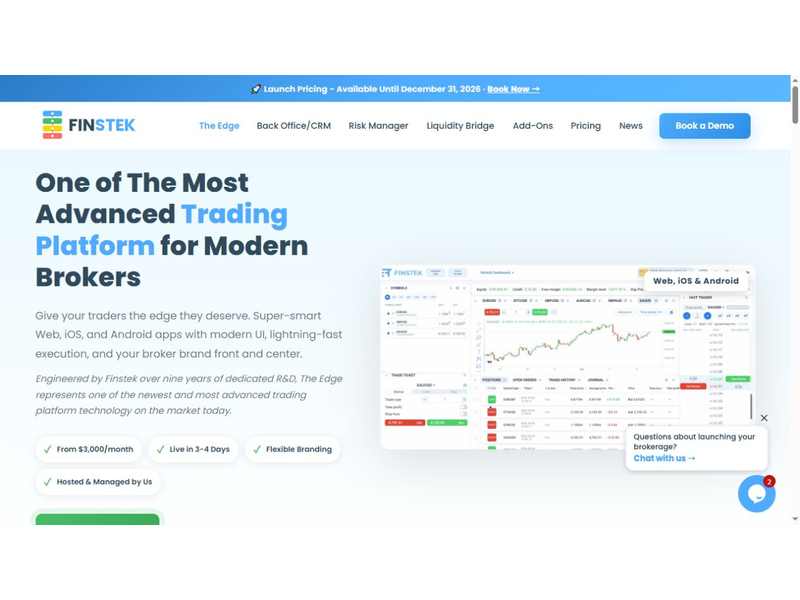
The Edge trading platform on Finstek’s official website.
How the Finstek brokerage stack fits together
The Edge provides the trader-facing experience. The bridge connects trading systems and liquidity sources, while the back office handles client records, onboarding, funding workflows and operational reporting. The included IB portal and marketing tools extend the same environment into partner distribution and client communication. Risk Manager adds a separate layer of consolidated exposure analysis and alerts.
For a new brokerage technology deployment, this arrangement brings several operational handoffs under one supplier. A registration can lead to a trading account; a payment can affect the client balance; trading activity can feed reporting and partner workflows. The commercial value depends on those handoffs being configured consistently across the broker's products, client groups and business rules.
| Component | Main role | Procurement distinction |
|---|---|---|
| The Edge | Web and mobile trading, charts and order entry | Standalone or included in Core Broker Stack |
| Liquidity Bridge | Price aggregation, execution routing and connectivity | Standalone or included in the stack |
| Back Office & CRM | Onboarding, payments, client records and reporting | Standalone or included with IB portal and marketing tools |
| Risk Manager | Cross-server exposure, PnL and dealing alerts | Priced separately; not part of the core package |
| Premium modules | Advanced IB tools, copy trading, contests and other extensions | Individually priced additions |
The Edge: a branded web and mobile trading environment
The Edge is Finstek's trading platform for web, iOS and Android. Its published feature set includes TradingView-powered charting, technical indicators, drawing tools, multiple timeframes and market, limit, stop and trailing-stop orders. Branding options allow a brokerage to present its own visual identity across the trading experience.
One distinctive interface feature is Fast Trader, which presents prices in a tunnel-style visualization and lets users place or adjust orders by sliding across the screen. Finstek also offers optional one-click trading for users who prefer direct order submission. These are interaction choices: the relevant implementation work includes setting permissions, explaining order behavior and ensuring the mobile and web experiences match the broker's intended customer journey.
Notifications cover price targets, execution confirmations, margin warnings and account events, with mobile push notifications on iOS and Android. A practical demonstration should follow one account across devices, including an amended order and an account alert. That shows how synchronization and communication work together, rather than judging the platform solely by a chart screenshot.
Liquidity Bridge: aggregation, routing and operational visibility
Finstek's Liquidity Bridge connects MT4, MT5 and The Edge, with FIX 4.4 available for custom connectivity and a REST API for reporting and configuration. The company lists more than 15 liquidity-provider connections. The technology allows brokers to combine price streams, configure markups and organize execution rules around their trading environment.
The published routing options cover A-book, B-book and hybrid models, with rules based on client groups, instruments, volume and other parameters. Automatic liquidity-provider failover and execution logs form part of the offering. Symbol mapping and normalization help align instrument definitions between the platform and liquidity sources, while session controls address market hours and rollover behavior.
These functions matter most when the dealing desk can trace a trade from the displayed price through routing to the execution record. For example, a broker introducing a new instrument needs consistent symbol mapping, markup settings, session hours and reporting. Reviewing those settings as one workflow reduces the chance of different teams using incompatible definitions.
Finstek also describes configuration changes without stopping trading, alongside latency monitoring, provider-health checks and execution analytics. Brokers can use a demonstration to inspect how an LP interruption appears in alerts, how routing changes are recorded and how the resulting fills are reconciled. Advertised execution-speed figures describe the vendor's offering; they do not establish a measured end-to-end result for every broker's network and liquidity arrangement.
Back Office & CRM: onboarding through ongoing client service
The Back Office & CRM connects registration, client information, funding and operational administration. Finstek describes onboarding steps that can vary by country or introducing broker, configurable document requirements and automatic trading-account creation under predefined rules. These features give operations teams a way to align account opening with their actual client segmentation.
KYC and AML checks can be handled manually or through integrated external providers. Document-expiry monitoring can notify both the client and the responsible compliance officer, with a configurable notice period. The product also supports KYT integrations for crypto transactions. The relevant business benefit is an assigned and traceable workflow, with staff able to see which document or review is outstanding.
Payment features include an e-wallet, deposit and withdrawal processes, configurable workflows and transaction monitoring. Finstek advertises more than 65 PSP integrations. A technical integration gives the broker a connection path; merchant acceptance, supported regions and settlement terms still need to be aligned with the chosen provider. In a product demonstration, a payment exception and its reconciliation record are as informative as a successful deposit.
The CRM adds lead tracking, task management and automated follow-ups. Role-based permissions control staff access, while reports and dashboards connect client activity with the business's operating picture. This can support a clearer division of work between sales, support, finance and compliance without requiring each department to maintain a separate account history.
IB distribution and marketing within the operating environment
The core offering includes an IB portal with multiple levels and referral tracking, together with a marketing suite for campaigns and email automation. The company's product material describes configurable hierarchies and commission-related capabilities. Its separately priced Advanced IB Portal adds performance dashboards, marketing materials, client-activity tracking and partner reports.
This distinction deserves attention in the scope document. The included portal, the Advanced IB upgrade and the additional commissions-automation module are separate commercial items. A broker should map its proposed partner structure to the exact deliverables, including calculation rules, statement visibility, payment approval and reporting responsibility.
Marketing functions include campaign management, email templates and automated messages. Their operational use extends beyond acquisition: document reminders, incomplete registration follow-ups and service communications can be connected to the client record. A coherent setup specifies which event triggers a message, who owns the template and how staff handle a client response.
Risk Manager for a consolidated dealing-desk view
Risk Manager is offered independently of the Core Broker Stack. Finstek lists support for MT4, MT5, cTrader and The Edge, with a Real-Time Vault that brings exposure, positions and profit-and-loss information across trading servers into a common view. Customizable dashboards provide different perspectives for dealers, risk staff and management.
The company describes analysis across 17 parameters and 19 preconfigured alert types. Examples of analysis dimensions include geography, instruments, IBs, campaigns and account groups. Thresholds can be configured by instrument, group or account, and critical events can trigger audible alerts. Historical analysis and daily summaries extend the system beyond the live screen.
Trade-decay monitoring examines price movement after execution, helping a dealing desk investigate patterns across instruments and accounts. Its practical use is to support routing and exposure decisions with transaction evidence. A deployment should align timestamps, symbol conventions and reporting currencies across connected servers so that a consolidated number has a consistent interpretation.
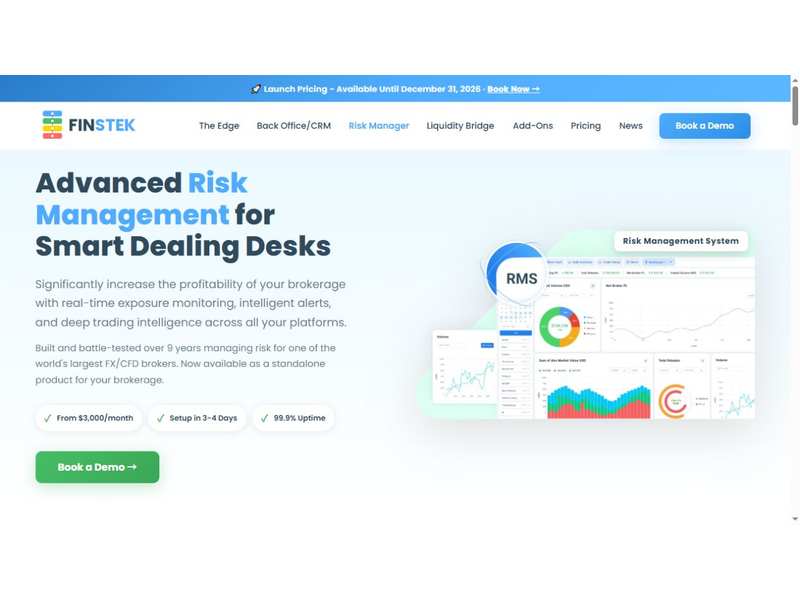
Risk Manager product presentation on Finstek’s official website.
Hosted operation and the responsibilities that remain with the broker
Finstek presents its products as hosted and managed services on Azure and AWS multi-region infrastructure. Its current materials include updates, security patching, backups, monitoring and round-the-clock support within the operating model. The advertised availability commitment is 99.9%; the service agreement should define its measurement, exclusions and incident response.
This model can reduce the amount of infrastructure a brokerage must operate internally. The broker still needs named owners for configuration changes, access approvals, client communication and reconciliation. A useful implementation plan identifies how those staff interact with Finstek during an incident, how changes are approved and how operational data can be exported.
The company advertises a three-to-four-day setup for its products. For project planning, that should be considered alongside the broker's readiness: branding assets, liquidity arrangements, payment connections, account groups and any migration requirements. A configured environment and a fully accepted business workflow are different project milestones.
Pricing and module scope
Finstek's October 2026 advertised Core Broker Stack price is US$6,000 per month plus US$1 per million in trading volume. It includes The Edge, Liquidity Bridge, Back Office & CRM, the IB portal and marketing suite. The pricing page illustrates US$500 million monthly volume as a US$500 volume charge, producing US$6,500 before additional items.
Standalone advertised prices are US$3,000 per month for The Edge and US$3,000 for Liquidity Bridge, each with the volume charge, and US$5,000 for Back Office & CRM without a volume fee. Risk Manager starts at US$3,000 per month for one trading server, plus US$1,000 for each additional server. It is expressly excluded from the core package.
Several premium modules are listed at US$2,000 per month each, including Advanced IB Portal, Social Trading, commissions automation and MAM for MT4. Setup fees may apply, and custom development, third-party tools and additional integrations can create further charges. The site labels the current offer as launch pricing available until December 31, 2026, so a procurement budget should use the agreed quotation and its detailed scope.
Where Finstek fits a broker's technology plan
Finstek is relevant to brokerages seeking a hosted trading and operating environment, as well as firms adding a bridge, back office or risk system to existing infrastructure. The strongest fit depends on the operational gap: trader experience, execution control, client administration or consolidated dealing information.
A focused demonstration can follow registration, account creation, funding, order placement, execution reporting and partner attribution in sequence. Adding a failed payment, an LP outage and a document-expiry event reveals how the same environment handles exceptions. That gives the buying team a concrete basis for matching Finstek's modules to its own workflows, staffing and technology budget.
 Subscribe Now