


How bitwallet Handles a Corrected Payment Request
An invoice for $840 goes out. Before the customer pays, the supplier agrees to a $40 credit. In bitwallet, what happens next depends on whether the original request is still open. A supplier can cancel an unpaid request and send one for $800. Once the first request has been paid, the cancellation option no longer applies. That distinction matters to anyone using the wallet to collect business payments: a bill, a request to pay it and the movement of money each leave a different record.
What the wallet adds to a supplier’s invoice
Operated by Singapore’s Bitwallet Service Group, bitwallet holds US dollars, Japanese yen, euros and Australian dollars. Its business account lets a merchant use a shop or company name and send a payment request to a particular email address. The company describes payments between wallet users as business payments, with a registered company or sole proprietor on the receiving side.
For a technology supplier billing a brokerage, the invoice number identifies the commercial obligation in the supplier’s books. The supplier can enter that number in bitwallet when issuing a request. It is an optional field, alongside a message. The wallet then assigns its own request ID. Keeping both references together pays off if two invoices for the same amount are sent to the same customer, or if one invoice needs a second request.
What “completed” means to the sender
The supplier selects a saved billing address or enters the recipient’s email address and billing details, checks the amount and sends the request. The confirmation at the end of that sequence means the request was sent. At that point the payer still has a decision to make. The two parties receive notices identifying the request, the account, the amount and the item. The supplier can follow the request in its payment-request history.
On the other side, the payer opens the request and signs in. Someone without an account must register to proceed. The payment guide describes two ways to pay a bill, by card or from a bitwallet account. The payer reviews the settlement details before confirming. A supplier looking at the earlier dispatch notification therefore has a reference to chase an outstanding bill, but no entry it can yet recognise as a receipt on that evidence alone.
Following the $40 correction through both requests
Suppose the $840 charge was for a month of software support and the parties agreed to reduce it to $800. These figures illustrate the workflow. Under bitwallet’s billing rules, an amount cannot be edited after the request has been sent. If the $840 request is unpaid, the supplier opens it in the request history, cancels it and checks its status. Both parties receive a cancellation notice carrying the original request ID.
The new $800 request can carry the supplier’s reference for the corrected bill. Keeping its new request ID next to the cancelled one explains why the customer has two emails asking for money while only one amount remains due. If the first payment went through before the correction, the supplier should check the transaction record before issuing a second bill. The cancellation control documented for an unpaid request cannot return money that has already moved. Any adjustment for that $40 starts with the completed payment record.
Which reference belongs in the cash ledger?
The payment-completion emails serve different readers. The payer’s notice includes the request ID and transaction ID. The supplier’s notice identifies the request and gives the amount and fees. A finance team can use the request ID to locate the bill and the transaction record to confirm the money movement. In this example, the $40 credit explains the difference between the two bills. Any processing fee shown on the completion notice is a separate entry.
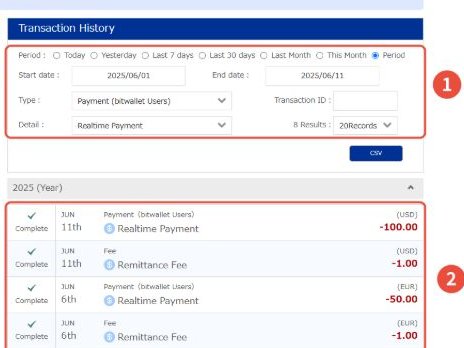
bitwallet’s guide shows payments and fees on separate lines. Its sample amounts are independent of the $840 billing example.
Transaction History also contains deposits, withdrawals and currency exchanges alongside payments between users. When several entries show $800, matching the amount alone can pick up the wrong one. The history supports filters for period, transaction type and transaction ID. Opening an entry reveals its type, timestamp, amount and ID. Up to 100 entries can be displayed at once, and the history can be exported as CSV. For the corrected support bill, the sequence worth retaining is short: the original request and its cancellation, the replacement request, and the transaction that paid it.
 Subscribe Now