


Hybrid Solutions: VertexPro Trading Platform and Broker Tools
Hybrid Solutions develops trading technology for brokers and financial institutions. Its current website presents VertexPro as a configurable trading environment combining client terminals, BackOffice administration, risk tools, APIs and third-party extensions. For a broker or proprietary trading firm, the proposition is a connected operating system: the client interface and the people administering accounts work around the same platform, rather than treating the trading terminal as an isolated purchase.
Fazzaco's Hybrid Solutions company profile classifies the business as a trading software, bridge and white label provider. The vendor's website says it has operated as an independent trading technology provider since 2002. This profile examines the products and package descriptions available on 21 October 2026, separating their published capabilities from the implementation decisions a buyer still needs to make.
VertexPro and the VertexFX product references
The current Vertex trading platform page uses the VertexPro Trader name. Fazzaco's directory description and the vendor's API documentation link still refer to VertexFX, while parts of the official website use Vertex or Vertex Trader. These references make product identification an important starting point for an evaluation.
A procurement brief should name the proposed product, release, hosting arrangement and supported interfaces. The coexistence of names does not establish that every historical VertexFX component has identical behavior in a current VertexPro deployment. The practical objective is to attach documentation and demonstrations to the exact software a firm will operate, especially when existing plugins or integrations are involved.
Hybrid Solutions positions itself as the technology supplier. Its footer states that it provides technology for financial institutions without intervening in their financial role or trading cycle. A white label platform therefore supplies an operating environment; it does not establish the brokerage's authorization, commercial terms or obligations to clients.
What the platform brings together
VertexPro's published architecture spans trader-facing applications and operational tools. The following map translates those product descriptions into the work performed by different teams.
| Component | Published capability | Operational relevance |
|---|---|---|
| Trading terminals | Desktop, web and mobile access with branding and configurable workspaces | Client account access, charts and order workflows |
| BackOffice | Account administration, activity monitoring, settlements and reporting | Client operations and firm-level oversight |
| Risk tools | Smart Dealer automation, group exposure settings and risk checks | Applying trading rules and monitoring exposure |
| APIs and toolkit | Automation and connections to external applications | Connecting existing systems to platform workflows |
| vStore | Plugins and tools for automation, analytics, charting and risk | Extending a deployment beyond its base configuration |
These components serve related purposes but should have individual acceptance criteria. A successful login confirms access; it does not confirm that settlements, permissions and third-party records reconcile. The implementation plan should follow complete business events across the components that will actually be enabled.
Client terminals and branded mobile access
The platform page describes desktop, web and mobile access, customizable layouts, plugin support and more than 80 indicators. The mobile section lists iOS and Android applications with a firm's identity and logo. These are relevant to businesses seeking a consistent branded experience across the devices their clients use.
The package comparison also distinguishes client and manager web terminals within the Enterprise offering. That distinction matters because a client interface and an administrative interface serve different roles. The buyer should identify which staff functions are available through a browser and which require another terminal, without assuming that all interfaces share the same permissions.
A device demonstration can use the same test account to check instrument visibility, order changes, open positions and transaction history. It should include a session interruption and reconnection. Those checks establish whether the configured client journey is coherent; they are more informative than treating a mobile application listing as proof that every workflow is identical across devices.
BackOffice as the account and operations layer
Hybrid Solutions describes BackOffice as a centralized environment for managing accounts, monitoring activity, automating settlements and applying firm-level controls. Its homepage adds client and trade monitoring, real-time reporting and multi-level administration. Together, these functions place account operations alongside the trading environment rather than outside it.
For an operating team, the important connection is between a change and the resulting record. Creating an account, changing a group, applying a commission rule or completing a settlement should produce information that the authorized teams can inspect. A useful demonstration follows a single account through those changes and compares client-facing records with the BackOffice view.
Multi-level administration also needs a responsibility map. Sales, customer service, dealing and finance teams should have access appropriate to their work. Buyers can ask the vendor to demonstrate the proposed permissions and the evidence retained for administrative changes. This is an acceptance question, rather than a claim that this article independently tested the platform's audit controls.
Smart Dealer, exposure settings and prop-firm rules
The platform material lists Smart Dealer automation, multi-level risk checks and exposure settings by group. The proprietary trading firm page additionally describes an internal Risk Bridge, account or group rules, drawdown limits, trading permissions, asset access, live exposure monitoring and alerts.
For firms running evaluations, the same page describes automated stage progression and evaluation parameters, together with trader dashboards covering exposure, win rate and profit and loss. These capabilities connect the rules of an evaluation to the records used by the team supervising it. They should be demonstrated against the firm's actual challenge specification.
For example, a drawdown rule needs a defined reference value, calculation period and response when a limit is reached. A stage transition also needs a clear effective time and treatment of existing positions. The firm should specify whether each environment is simulated or live and how a participant's payout eligibility is determined. Software configuration supports those decisions but does not replace the firm's participant agreement.
APIs, software partners and the vStore ecosystem
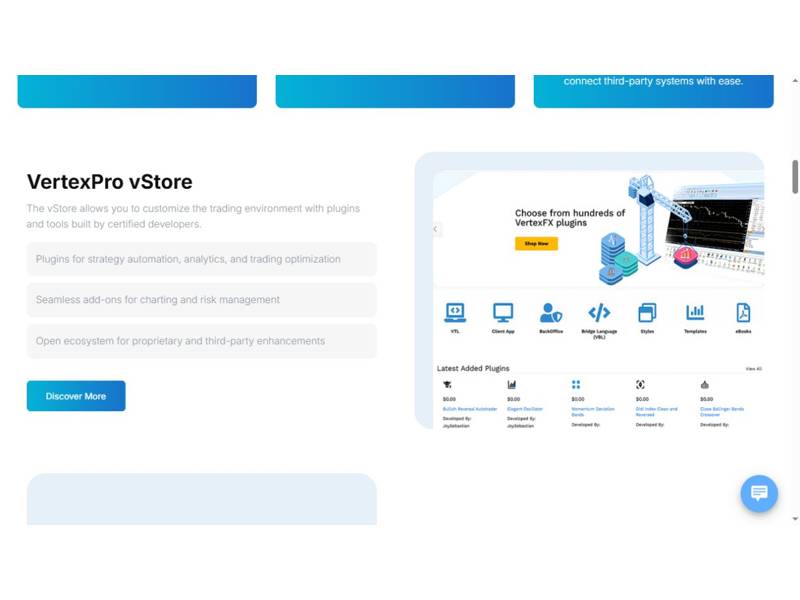
Official VertexPro product page, captured on 21 October 2026. Store examples illustrate the vendor’s extension ecosystem.
The official product page describes APIs for workflow automation, custom tools and third-party connections. The homepage also identifies an Independent Software Vendor program using the Vertex API toolkit. This creates a route for businesses that want to combine a branded trading environment with their own applications.
The site's API documentation link retains the VertexFX name. During this review, that documentation destination did not return readable content, so this article does not attribute particular programming languages, endpoint coverage or authentication methods to the current release. Those details should be confirmed against the documentation supplied for the proposed installation.
VertexPro vStore is presented as an extension ecosystem for strategy automation, analytics, charting and risk tools. A plugin evaluation should identify its developer, release compatibility, permissions, support owner and update process. API availability and a store listing are starting points for integration planning; a tested account, order and reconciliation workflow provides stronger evidence that the selected combination fits the business.
Startup and Enterprise packages: compare scope before price
On 21 October 2026, the VertexPro packages page displayed Startup Brokers and Enterprise Brokers cards with request-a-quote links. Startup was described as provided through trusted partners, subject to terms. Its listed scope included branded desktop and web terminals, BackOffice access, APIs and toolkit, a mobile app and 24/6 technical support.
The Enterprise card listed branded desktop terminals, client and manager web terminals, full BackOffice access, a branded mobile app, built-in risk management, APIs and toolkit, and 24/6 support. The page's FAQ also mentions WhiteLabel as a package name. Because these labels are not expressed as one detailed public price matrix, buyers should obtain a written module and responsibility schedule.
No numerical subscription fee was displayed in the reviewed package cards. The quotation should distinguish setup, recurring platform fees, branded applications, hosting, integrations, extensions and support. For a partner-provided arrangement, it should also identify which organization contracts with the broker and which handles technical escalation. A shared product name does not by itself define the same service boundary.
Planning a deployment around actual business events
The homepage presents fully hosted technology and an onboarding sequence from plan selection and quotation to setup, integration and launch. A buyer can turn that sequence into a concrete deployment plan by defining the account model, instrument configuration, user roles, integrations and reporting needed before client access begins.
A representative acceptance run should create an account, assign its group, submit and modify an order, apply the relevant commission or risk rule, and reconcile the resulting records. Include a controlled connection interruption and a support escalation. For a prop firm, add an evaluation-stage transition and a rule breach using agreed test data.
Hosting location, recovery objectives, maintenance windows and incident ownership belong in the service agreement. The vendor's public statements about speed or reliability do not constitute measurements made by Fazzaco. Firms comparing platforms should request evidence for their proposed configuration and workload rather than applying a general marketing statement to every deployment.
Where Hybrid Solutions fits in vendor discovery
Hybrid Solutions is relevant to brokers seeking a branded trading stack with operational administration, and to prop firms evaluating integrated account rules and trader oversight. VertexPro combines terminal access, BackOffice, risk tools and an extension route in one product proposition. The package and partner structure makes scope definition particularly important when comparing offers.
A productive vendor discussion starts with the business process the firm needs to operate, then maps the proposed product version and modules to that process. This approach makes the comparison about usable workflows, accountable support and integration boundaries, rather than a count of feature labels.
Sources and verification: Hybrid Solutions' official homepage, Vertex trading platform, packages and proprietary trading firm pages, plus its Fazzaco company profile, were reviewed on 21 October 2026. Product descriptions are based on those public materials. Deployment scenarios and acceptance questions are Fazzaco's editorial analysis; no independent latency, uptime or trading-performance benchmark was conducted.
 Subscribe Now