


Paid at the Counter: When Can a Merchant Fulfil a PaysafeCash Order?
A customer places a €48 order online, takes a barcode to a shop and pays the cashier. The retailer that took the cash and the merchant that owes the customer the goods may be two different businesses. How does the online merchant know when to release the order? Paysafe Group connects the two through PaysafeCash. Its merchant service assigns the cash to a specific payment and sends the online merchant confirmation when it has captured the money.
That division of labour matters to a business adding cash to its checkout. The customer may leave the website hours before visiting a payment point. In the meantime, a barcode exists, an order may be reserving stock, and the merchant still has no payment to fulfil. The events in PaysafeCash’s direct merchant integration show what the order desk can reasonably tell the customer at each stage.
The order starts a clock
Take the €48 order as an example. The merchant creates a payment for that amount in euros and generates a barcode for it. The customer can keep the barcode on a phone or print it. A participating payment point scans the code and accepts the cash. The merchant has already specified the amount and currency, so the cashier can collect the money against the right transaction without having to identify the goods in the online basket.
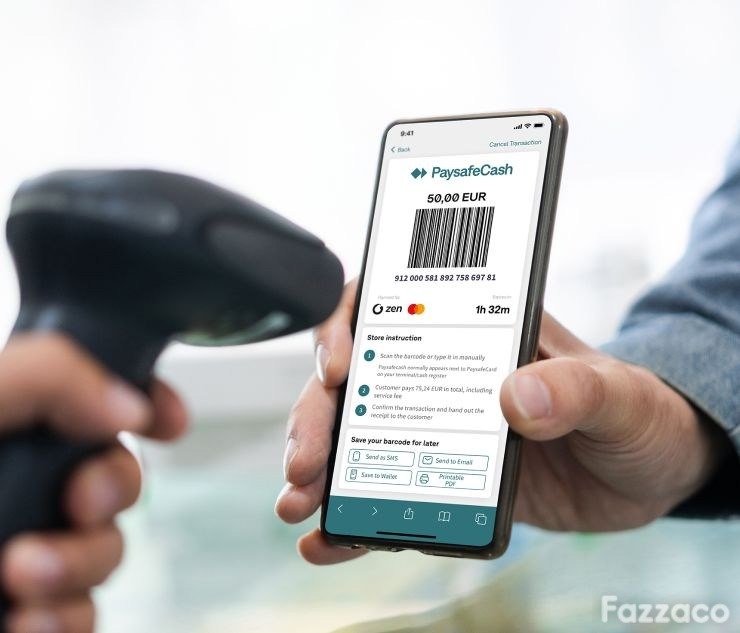
Paysafe’s example shows the amount and barcode a customer presents at the payment point. The merchant receives its payment confirmation separately.
Paysafe’s payment guide gives the barcode a default life of 72 hours, measured from creation of the transaction. The merchant can set a different period for an individual payment. If our example starts at 10 a.m. on Monday and uses the default, the deadline is 10 a.m. on Thursday in the same time zone, assuming no clock change. Opening the barcode on Wednesday evening uses what is left of that window. An order email that says “pay by Thursday at 10 a.m.” gives the customer more useful information than “pay within three days” each time they reopen it.
What the cashier knows and what the merchant knows
At the counter, handing over the money is the event the customer sees. A merchant can ask Paysafe to enable a notification called MONEY_HANDOVER for that event. It can support a “processing” message when the order is still pending. Paysafe tells merchants to wait for PAYMENT_CAPTURED before crediting the customer. Capture means PaysafeCash has assigned the money to the transaction and completed the payment on the merchant’s behalf. The merchant verifies the notification before releasing the goods or service.
There is a practical wrinkle for customer support: notifications can arrive out of order. Paysafe documents that a delayed handover message can arrive after capture. Suppose the €48 order has already been marked paid on a verified capture. Recording the late handover against the same payment preserves the history. Switching the order back to “processing” would instead leave the customer looking at a request to finish a payment they have already made. Paysafe advises checking the transaction’s current status when events arrive in this order.
When a customer asks for their money back
The first question is whether a payment was completed. If the barcode simply went unused and expired, there is no €48 collection to refund. The old code becomes unusable and a customer who still wants to proceed needs a new one. The merchant’s expiry notification can also be triggered when the customer cancels on the barcode screen, so a support message should avoid assuming that every expired payment means someone missed a deadline.
A customer returning goods after payment is a different case. According to Paysafe’s merchant FAQ, the refund for a completed account-based payment goes to the customer’s PaysafeCash account. If the original payment was made without such an account, the merchant needs to arrange another refund method. For a support agent handling the €48 order, the most useful details are the original payment reference, whether capture was confirmed and whether the customer used a PaysafeCash account. Those facts distinguish an unused code, a paid order and a return, even though all three conversations may start with the same words: “I went to the shop.”
 Subscribe Now