


FXBO Forex CRM: Back Office, Client Area, IB Tools and Pricing
FX Back Office, also known as FXBO, develops CRM and operational software for brokerages. Its core offering links a staff-facing Back Office with a branded Client Area and a Partner Area for introducing brokers. A separate Prop Trading CRM extends the product range to challenge administration and trader monitoring. Together, these products address the records, communications and administrative tasks surrounding a brokerage’s trading infrastructure.
Fazzaco lists FX Back Office (FXBO) as a Forex CRM Provider. FXBO’s own website makes its role explicit: it supplies technology, rather than operating as a broker, executing trades or accepting traders’ funds. This company profile draws on official pages checked on October 13, 2026, and examines the product range, integration model and published pricing. Feature descriptions are vendor disclosures; the analysis does not represent an independent software benchmark.
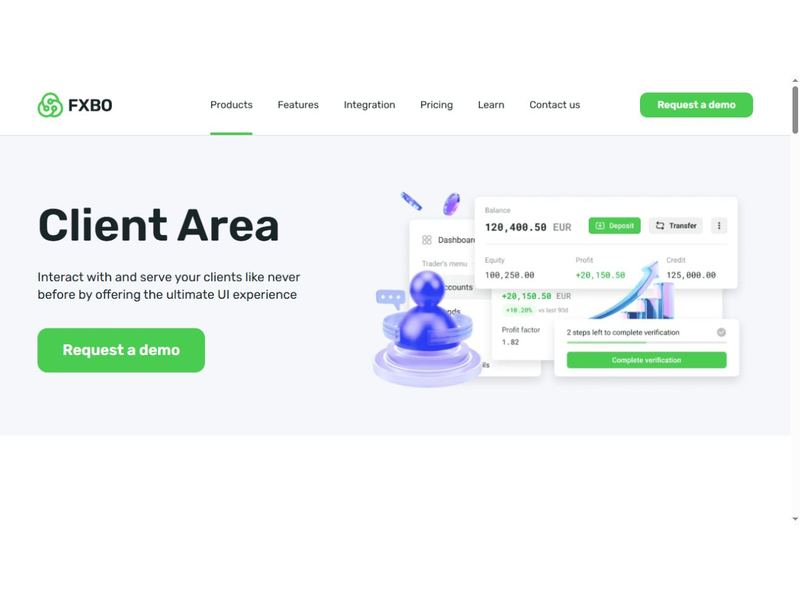
Source: FXBO official Client Area page, captured October 13, 2026. Interface figures are vendor demonstration data.
Three connected workspaces for brokerage operations
FXBO organizes its main brokerage offering around the different people using it. Employees work in the Back Office, customers use the Client Area, and introducing brokers manage their activity in the Partner Area. This structure is useful for understanding the product: a customer’s account and documents, an employee’s follow-up task and a partner’s referral relationship are related records, but each audience needs a different interface.
The product pages emphasize customization across these environments. The Back Office covers client information, documents and departmental access; the Client Area includes branded registration and account workflows; the Partner Area supports campaign and commission administration. Rather than treating CRM solely as a sales database, FXBO positions it as an operational layer shared by sales, onboarding, finance, support and partner-management teams.
For a brokerage with several offices, that shared layer can provide a common place to organize work. The deployment discussion should identify which information is shared across offices and which permissions remain specific to a department, brand or staff role.
Back Office: client records, documents and departmental tasks
The Back Office product page describes storage and management of contact details, verification documents and transaction history. It also lists customer-registration notifications, callback requests, client categorization, current and historical trading-platform transactions, and tools for managing IB and affiliate networks.
Document administration has its own workflow. FXBO lists expiration notifications and an interface for documents needing attention, alongside notifications for daily incoming and outgoing transactions. These functions address routine tasks that can otherwise become disconnected spreadsheets or email reminders. An operations team can use the proposed system design to define who reviews a document, how the customer is contacted and how outstanding work remains visible.
The published automation scope includes targeted-marketing algorithms, mass or targeted email, automated email processes and the creation of access permissions, tasks and requests for different departments. FXBO also describes CySEC and internal financial report generation. Such reporting functionality should be evaluated against the broker’s actual reporting obligations and data definitions; a software report is not, by itself, evidence that every regulatory requirement has been satisfied.
The Client Area brings onboarding and account servicing together
FXBO’s Client Area is the customer-facing part of the system. The company says its visual elements and workflows can be branded, with multiple onboarding paths, multilingual presentation and registration emails. It also describes built-in questionnaires, appropriateness tests and automatic scoring that can produce different outcomes.
This combination makes onboarding a configurable process rather than merely a registration form. A brokerage can discuss different paths for its customer groups, the information collected at each step and how assessment results affect the next action. The exact scoring rules and decisions remain matters for the brokerage’s operating and compliance framework.
After registration, the Client Area displays account information, supports deposit and withdrawal functions and provides downloadable client history and reports. Live chat, action notifications and built-in calls to action are also listed. Referral functions allow customers to introduce others, while link-creation tools, banners and statistics support partner acquisition. FXBO additionally advertises a Client Area mobile app; platform availability and the precise feature scope should be confirmed for the proposed deployment.
The Partner Area gives IBs a dedicated operating interface
The Partner Area focuses on the daily work of introducing brokers. FXBO describes campaign creation and management, referral and volume tracking, commission visibility and rules defining how an individual IB is paid. The product page also describes commission payment after transactions, making the configured commercial agreement an important part of implementation.
Specific tools include requests for multiple IB accounts, application-status tracking, storage of IB agreements and the ability for partners to edit their information. Performance reports show campaign clicks and registrations; banners support campaign activity, and notifications alert staff to partner actions requiring attention.
These functions address both sides of the relationship. Partners need to understand their activity and compensation, while the brokerage needs documented terms and a manageable approval process. A useful product demonstration follows one campaign from its link and registration records through the resulting commission calculation. The agreement, applicable transaction data and partner-facing report should describe the same commercial arrangement.
Prop Trading CRM adds challenge and trader administration
The Prop Trading CRM supports multistage challenges with configurable trading conditions, goals and limitations. FXBO states that operators can create free or paid challenges, manage traders and profiles centrally, and monitor activity and performance. Its published feature set includes risk parameters, flexible thresholds and a read-only account status when specified objectives are not met.
The page also describes reporting on trading activity, profitability and exposure, plus multicurrency accounts, leverage settings and connections with platforms such as MetaTrader and cTrader. For an operator, the important product distinction is the addition of challenge rules and progression logic to customer and account administration.
FXBO supplies the software; it is not offering its own trader-funding programme through this product description. Although the page explains an illustrative progression from evaluation to a funded account, the trading environment, capital arrangement, payout terms and participant agreement depend on the firm using the system. A challenge-management feature should not be read as a promise that every programme involves live trading or real-capital funding.
Trading-platform integrations extend the CRM’s operating reach
FXBO’s trading-platform directory lists MetaTrader 4, MetaTrader 5, cTrader, Match-Trader and TradeLocker. It also includes Helio, Dev Experts, X Open Hub, Condor and Your Bourse. These names span different trading and infrastructure products, so the directory is best read as a map of available integration relationships rather than a statement that every connector performs identical functions.
The relevant detail is the exchange between the selected platform and the proposed CRM environment. Account creation, account status, balance information and trading activity may involve different synchronization requirements. A broker moving between platforms also needs to know how customer identities and historical records remain connected.
For procurement, the practical next step is a connector-specific scope: the platform version, required access, supported events and responsibility for maintaining the connection. This makes the integration discussion concrete without assuming that a platform’s presence in the directory establishes every capability needed for a particular brokerage configuration.
KYC and payment directories require a deployment-specific scope
The KYC directory includes Sumsub, a separate Sumsub Web SDK entry, Shuftipro, AVRION Risk, Muinmos and other providers. The payment-provider directory includes services such as OpenPayd, Match2Pay, Neteller, Skrill and Stripe, with browsing categories for deposits, withdrawals, crypto and cashiers.
Both directories include practical terms about maintenance. FXBO describes the listings as indicative of existing integrations and explains that changes at a provider can require updates. It does not guarantee that every listed connection currently works unchanged; updates or requested integration changes may involve additional costs. The terms also place responsibility on the broker to notify FXBO when an update is needed on the provider’s side.
The payment terms further distinguish a provider’s general country or currency coverage from support within FXBO’s own implementation. Particular regions or currencies may need additional work, subject to feasibility and possible charges. This is a useful basis for a precise delivery schedule: name the provider, intended payment direction, currencies and target markets, then obtain confirmation of the connection being delivered. Provider listing alone does not establish merchant acceptance or service availability for an individual broker.
Published pricing: manager limits, PSP allowances and setup costs
The FXBO pricing page presents two priced plans and a custom option. As checked on October 13, 2026, the clearly stated figures were:
| Plan | Published monthly price | Manager allowance | PSPs shown |
|---|---|---|---|
| STANDARD | €2,500 | Up to 12 managers | 5 |
| UNLIMITED | €10,000 | Unlimited managers | 10 |
| CUSTOM CHOICE | Quote required | Confirm in proposal | Confirm in proposal |
The page explicitly excludes a required one-time onboarding setup fee from the displayed prices. It also states that adding a PSP or KYC provider beyond what is included in the selected package attracts a one-time fee. Buyers therefore need to budget beyond the monthly subscription when their implementation requires additional connections.
Beyond subscription cost, the written quotation should identify the Back Office, Client Area and Partner Area modules being supplied, together with API access, automated KYC, Brokeree PAMM or Social Trading connections, development work and support terms where required. The selected package and any additional services need to be agreed as one delivery scope. “Unlimited managers” describes staff capacity; integration allowances and customization remain separate commercial considerations.
Which brokerage requirements does FXBO address?
FXBO is relevant to firms that want customer administration, branded self-service and IB operations within a connected software environment. Its specific attractions are the combination of document workflows, configurable onboarding, partner campaign tools and a broad integration directory, with a separate product for challenge-based prop operations. The published price structure also gives procurement teams an initial basis for comparing manager capacity and payment-connection needs.
The strongest evaluation concentrates on the brokerage’s intended operating model. Agree the required modules, staff access, onboarding paths, partner terms and external connections, then use representative records to confirm that information moves correctly between the three main workspaces. For prop operations, add the exact challenge rules and account-state transitions. This keeps the final decision grounded in FXBO’s actual product scope and the brokerage’s delivery requirements, rather than feature counts or general marketing claims.
 Subscribe Now