


TradingView Introduces New Tool for Adding Ideas on the Chart

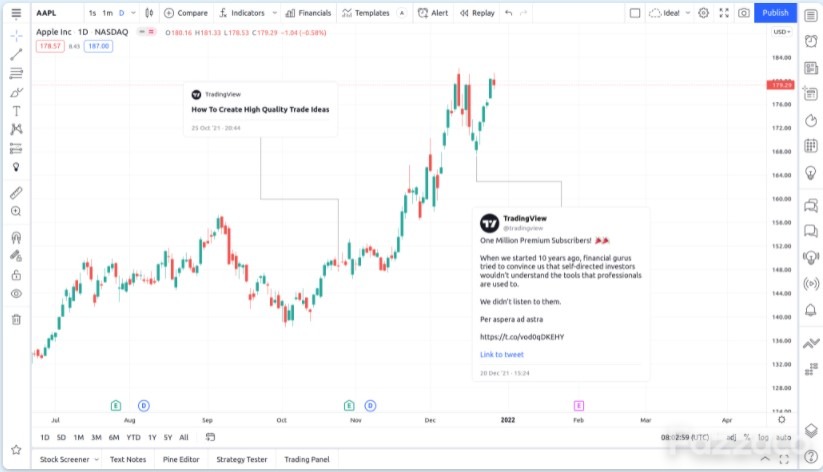
TradingView, a top-rated charting application used by millions of traders worldwide, announced on Wednesday the introduction of a new tool - Idea to embed tweets onto the charts.
Below are the features of Idea:
An idea on a chart is always attached to the date of its publication.
The position of the idea card can be changed within the visible area of the chart. For this users need to pull the card in the direction they need.
Clicking on the title of an idea will open a full-fledged pop-up window with it.
The idea is very similar to any drawing object: it is linked to the symbol users added it to.
An idea can be hidden or deleted, and its visual order in the object tree can be changed.
“Thousands of users post trading ideas on our platform every day to share their thoughts and opinions on the global markets, showcase their analytical methods and strategies, offer training materials to other members of the community, or even show off their artistic skills,”said the company.
There are two ways to add an idea to a chart:
Select the “Idea” tool in the left panel, then paste the link to the idea in the window that opens.
Copy the idea link and paste it into the TradingView chart using “Ctrl + V” on Windows or “⌘V” on Mac. Or just click “Paste” in the context menu of the chart.
The firm notes that a idea is added at the position that corresponds to the time the idea is published.
In November, TradingView announced the launch of version 3.7 of Lightweight Charts, an open-source charting library.
 Subscribe Now